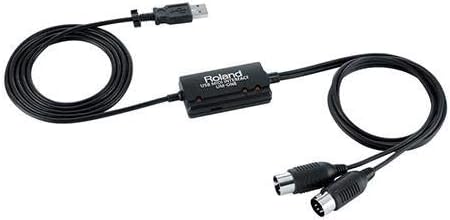
Roland UM-ONE-MK2
4.5Editor score
One MIDI input
One MIDI output
Integrated USB cable
Mac and Windows support
Our MIDI Interface for Mac guide compares ten options for reliable MIDI connectivity, routing, low latency, broad compatibility, and an easy Mac setup for
A MIDI interface for Mac connects electronic instruments, controllers, and MIDI-equipped hardware to a computer for recording, sequencing, performance, and studio control. A worthwhile model should deliver dependable data transfer, broad macOS compatibility, useful indicators, and a connection style that suits your instruments without creating unnecessary setup complexity.
We compared the supplied options by MIDI channel support, input and output configuration, driver requirements, latency-related features, routing tools, physical connections, operating-system support, and overall suitability for a Mac-based workflow. The list includes dedicated MIDI interfaces and several audio interfaces that may serve producers who also need microphone or instrument recording.
Each review explains the interface's strongest capabilities, practical limitations, and likely audience, helping you separate dedicated MIDI tools from broader audio-recording hardware. Ratings and product details reflect the supplied information, while current prices and availability can change, so confirm the latest listing and compatibility before buying.
4.5Editor score

4.6Editor score
4.4Editor score
This side-by-side comparison covers every product in the guide, highlighting MIDI connections, channel capacity, routing features, platform support, and the most important trade-off for Mac musicians.





The CME U6MIDI Pro combines three MIDI inputs with three outputs in a single USB-C interface, giving Mac musicians a more expandable connection than a conventional one-to-one cable. Its 4.6 rating reflects a broadly favorable user impression, while features such as standalone operation, MIDI routing, and message filtering make it suitable for serious home studios, stage rigs, and multi-instrument production setups.
We may earn a commission when you buy through this link, at no additional cost to you.
Its strongest advantage is the balance between physical connectivity and software control. The UxMIDI Tools application can configure MIDI split and thru, merge, and filter operations, allowing the same interface to serve recording, live performance, or hardware synchronization tasks. It supports all 16 MIDI channels and messages including notes, controllers, clock, system exclusive, MIDI timecode, and MPE, which helps avoid a bottleneck when moving beyond basic keyboard control.
The interface also advertises close-to-zero latency, low jitter, error-free wired transmission, and support for major operating systems including macOS. Because it can work as a standalone MIDI router and filter, it is not limited to a Mac-centered workflow. That makes it particularly valuable for users combining modern USB MIDI devices with traditional five-pin DIN hardware, although a simple keyboard owner may find its capabilities more elaborate than necessary.
This is our leading choice because it offers the most convincing combination of port count, routing flexibility, standalone utility, and broad message support in the supplied group. Choose it when you want room to grow, operate more than one MIDI instrument, or need detailed message control. For a single controller and a simple recording task, a smaller cable-based interface may be easier to manage.
The included configuration utility turns the interface into more than a basic USB adapter. Split, thru, merge, and filter settings can be adjusted for different instruments or parts of a production, and saved behavior may reduce setup changes between rehearsal, recording, and performance.
Standalone routing means the hardware can organize MIDI signals even when it is not acting as a simple computer accessory. For users moving between a Mac and traditional MIDI equipment, that capability can make the interface more useful than a basic input-output cable.
We may earn a commission when you buy through this link, at no additional cost to you.
The LEKATO MIDI Cable is a direct USB Type-C MIDI interface for Mac, Windows, and compatible mobile users who need to connect a standard MIDI-equipped instrument to a computer. It provides one input, one output, support for up to 16 input and output channels, and a built-in driver, making it a practical option for keyboard recording, editing, and basic controller use.
We may earn a commission when you buy through this link, at no additional cost to you.
The six-and-a-half-foot integrated cable is a meaningful convenience for a desktop or studio setup. It removes the need to assemble a separate USB cable and MIDI lead, while the intelligent LED indicators make it easier to distinguish power from active signal transfer. That visibility is useful when diagnosing a quiet output, disconnected instrument, or inactive MIDI port.
The manufacturer emphasizes fast, stable transmission, low latency, and interference-resistant wiring. Compatibility is listed for Windows and Mac OS, along with electronic keyboards, digital pianos, synthesizers, and drum pads. The built-in driver supports plug-and-play operation, which reduces the usual friction associated with class-compliant or proprietary MIDI connections.
The important limitation is that the cable represents a conventional one-in, one-out interface without the routing, filtering, or multiport capabilities found in the CME devices. Some older or unusual instruments may also need particular driver or firmware settings. For most Mac musicians connecting one standard controller or keyboard, though, it offers a simple, focused solution.
A built-in driver and integrated USB-C connection remove several setup steps. Once the MIDI ports appear in the Mac's audio MIDI setup, compatible software can generally treat the connected keyboard or controller as a MIDI input and output.
Separate red and blue indicator behavior helps identify power and signal-transfer activity. This is a small feature, but it can save time when a software track is not receiving notes or a destination is not receiving controller commands.
We may earn a commission when you buy through this link, at no additional cost to you.
The Focusrite Scarlett Solo 4th Gen is an audio interface rather than a dedicated MIDI interface, but it can be a useful companion for a Mac-based producer who records both microphones or instruments and external MIDI equipment. Its supplied features include a 120dB dynamic range, improved Air mode, USB-C connectivity, and a software bundle for recording, mixing, and mastering.
We may earn a commission when you buy through this link, at no additional cost to you.
The Solo format is aimed at streamlined production. It lets a user connect a microphone and guitar, then begin working with the included software. Air mode is intended to add presence and harmonic character to vocals and guitars, while the converter performance and dynamic range are the more important considerations for anyone seeking a high-quality audio path into a Mac.
It is essential not to confuse audio inputs with MIDI connections. The supplied specifications for this model do not list a five-pin MIDI input, MIDI output, or USB MIDI device capability. If your main requirement is sending note or controller data from a keyboard into GarageBand, Cubase, Logic Pro, or another DAW, this Scarlett model should not be selected on the assumption that it includes MIDI.
Choose the Scarlett Solo 4th Gen when your priority is a compact audio-recording interface and you already have another confirmed source of MIDI connectivity. It earns its place in the guide for Mac producers combining audio and MIDI, but the CME U6MIDI Pro is the more direct answer for users whose primary requirement is dedicated MIDI hardware.
The stated 120dB dynamic range and use of higher-tier converters make the Solo 4th Gen appealing for vocals, guitars, and small home-studio projects. It addresses the audio side of production, where a separate MIDI interface cannot substitute for microphone preamps and balanced recording connections.
Pro Tools Intro+, Ableton Live Lite, Cubase LE, and Hitmaker Expansion give a new user immediate tools for recording and production. The bundle does not change the need to verify MIDI hardware separately, but it helps the interface function as the center of a broader Mac music setup.
We may earn a commission when you buy through this link, at no additional cost to you.
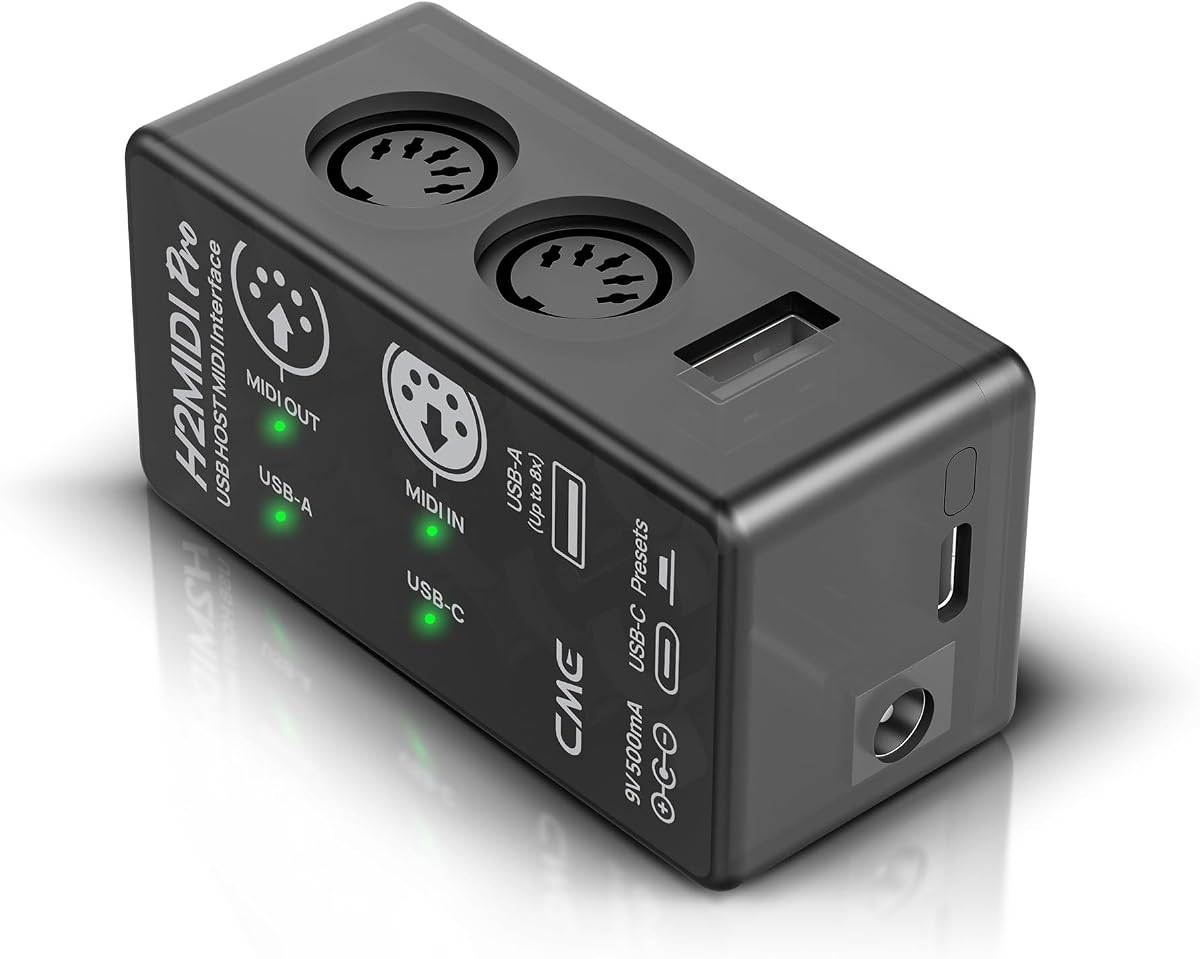
The CME H2MIDI Pro Compact is an advanced MIDI interface distinguished by its ability to operate as a standalone USB host. It can connect class-compliant USB MIDI devices directly to traditional five-pin DIN MIDI hardware without a computer, while its computer mode provides two MIDI inputs and two outputs over USB-C for Mac, Windows, iOS, Android, Linux, and ChromeOS.
We may earn a commission when you buy through this link, at no additional cost to you.
The supplied information highlights a 32-bit processor, high-precision transmission, and support for complex messages including clock, system exclusive, MIDI timecode, and MPE. HxMIDI Tools provides routing, filtering, mapping, and splitting controls, with space for four presets. Those tools are valuable when moving between different projects, patches, or parts of a live setup without repeatedly changing hardware connections.
As a standalone USB host, the H2MIDI can bridge modern and legacy MIDI ecosystems. Up to eight USB MIDI device ports can be supported through a standard USB hub. This expands its usefulness for a studio combining class-compliant controllers with older synthesizers, although the requirement to plan those physical connections shows that it is not necessarily the simplest choice for a beginner.
We identify it as the premium option because it combines computer connectivity, standalone hardware behavior, sophisticated configuration, and broad platform support. It is especially attractive to Mac users who need reliable MIDI routing and frequently switch between modern USB devices and classic DIN gear. Those wanting only a keyboard link should consider the LEKATO or Roland options instead.
The USB host function can reduce dependence on a computer for MIDI routing between compatible USB instruments and five-pin hardware. This is valuable in a hybrid studio or stage setup where a permanent Mac connection would be inconvenient.
Four saveable configurations allow routing, filtering, mapping, and splitting arrangements to be recalled during a session or performance. The ability to switch complete setups quickly is more useful than making individual connection changes by hand.
We may earn a commission when you buy through this link, at no additional cost to you.
The FORE T1 is a basic USB Type-C MIDI interface designed to connect a keyboard, synthesizer, electronic drum, or similar device to a Mac, Windows computer, iOS device, or Android device. It provides one MIDI input, one MIDI output, support for 16 input and output channels, and an integrated six-and-a-half-foot cable for a straightforward workstation setup.
We may earn a commission when you buy through this link, at no additional cost to you.
Its built-in driver is designed to support plug-and-play operation, while red and blue LEDs indicate power and signal-transfer status. The manufacturer also lists compatibility with popular sequencing environments such as GarageBand, FL Studio, CoreMIDI, Cubase, Sonar, and MIDI Connections, which makes it relevant to a broad range of Mac production workflows.
High-performance processing and fast, stable data transmission are the main technical attractions. The integrated cable and USB bus power avoid the need for a separate power supply, while multilayer wire protection and electromagnetic-interference resistance are intended to support dependable communication over the cable length.
One point to note is that a USB A-to-C adapter is not included. MacBook and modern desktop users with USB-C should generally be covered by the native connection, but users relying on USB-A may need an appropriate adapter. This is a sensible one-in, one-out choice for uncomplicated Mac MIDI tasks, although it lacks the port count and configuration tools of the CME interfaces.
The Type-C connection and cross-platform support make the T1 convenient for a Mac-centered setup that may also involve an iPad or Android device. It can serve as a simple bridge for recording or editing without requiring a separate desktop MIDI box.
Distinct power and transfer indicators help confirm that the cable is active and that MIDI data is moving. This reduces guesswork when software fails to receive notes or when an output destination is not responding.
We may earn a commission when you buy through this link, at no additional cost to you.
The Focusrite Scarlett Solo 3rd Gen is a compact audio interface for Mac and Windows users who want to record vocals, guitars, and other analog sources. It supports recording and mixing at up to 24-bit/192kHz, offers two high-headroom instrument inputs, and provides low-noise balanced outputs for clean playback through studio monitors or headphones.
We may earn a commission when you buy through this link, at no additional cost to you.
Its preamps and switchable Air mode are designed to give recordings a brighter character, particularly for acoustic instruments. Gain Halos provide visual guidance for setting levels and reducing unwanted clipping. Together with the stated converter performance, these features make the Solo 3rd Gen relevant to producers who need a dependable audio front end alongside their MIDI workflow.
The supplied information does not identify any MIDI input, MIDI output, or USB MIDI feature. As a result, this product should be treated as an audio interface rather than a dedicated solution for the stated search. You would still need a confirmed MIDI interface, such as the LEKATO, FORE, Roland, or CME option, to connect a five-pin MIDI controller to the Mac.
The Solo 3rd Gen remains a practical audio-recording choice because it includes Pro Tools Intro+, Ableton Live Lite, Cubase LE, and Hitmaker Expansion, along with a three-year warranty. It is best for a Mac producer who already has MIDI hardware or uses a software instrument and wants an all-in-one audio path for the microphone or guitar.
Gain Halos give visual feedback as input levels change, helping users identify a useful recording range without relying entirely on software meters. This is helpful when moving between quiet acoustic sources and louder electric instruments.
Two low-noise balanced outputs support clean playback, while the headphone connection supports private monitoring. These features make the interface appropriate for small studios where accurate playback is needed alongside recording.
We may earn a commission when you buy through this link, at no additional cost to you.
The FORE MIDI USB Interface is a portable Type-C adapter for connecting one MIDI-equipped keyboard, synthesizer, or electronic drum to a Mac or other compatible device. It supports one MIDI input, one MIDI output, and up to 16 channels in each direction, covering the core requirements of a single-instrument recording setup.
We may earn a commission when you buy through this link, at no additional cost to you.
A built-in driver and intelligent LED indicators are designed to make setup and troubleshooting straightforward. Red and blue lights show power and signal-transfer conditions, while compatibility is listed with GarageBand, FL Studio, CoreMIDI, Cubase, Sonar, and MIDI Connections. That gives users confidence that the adapter can appear as a standard MIDI source in common Mac software.
The six-and-a-half-foot integrated cable offers enough reach for many desk arrangements, and USB bus power eliminates the need for an external supply. The listed wire construction and electromagnetic-interference resistance are intended to maintain stable transmission, while the processing chip supports fast, low-delay input and output.
Like the FORE T1, this interface is best for uncomplicated use and does not provide multiport routing or message filtering. The USB A-to-C adapter is not included, which is worth considering if your Mac has only USB-A ports. It remains a sensible portable choice for recording and editing with a single standard MIDI device.
Compatibility with CoreMIDI and major DAWs means the interface can be used in established Mac production environments. The built-in driver is intended to appear as a standard MIDI connection without a complicated manual setup.
Combining the interface and cable into one unit simplifies packing and transport. It is convenient for a rehearsal room, mobile production kit, or second recording location where a larger desktop MIDI box would be unnecessary.
We may earn a commission when you buy through this link, at no additional cost to you.
The PIYONE Q28 is a two-channel USB-C audio interface for PC, Mac, and iOS recording. It combines XLR/TRS combo inputs, 24-bit/192kHz conversion, 48V phantom power, balanced monitoring, a 3.5mm headphone output, and direct monitoring in a compact design suited to mobile and home studios.
We may earn a commission when you buy through this link, at no additional cost to you.
Its class-compliant approach means no additional driver is required, while bus power removes the need for a bulky external supply. The illuminated gain rings are both decorative and practical, making levels easier to see in a dim workspace. Users can connect a condenser microphone through XLR or a guitar or line-level source through the appropriate combo-jack option.
The direct monitor function supports low-latency tracking, which can help performers hear themselves without noticeable delay. A loopback or monitor-mix function is also listed among the features, making the interface more useful for livestreaming, online performance, and recording demonstrations alongside a Mac-based production setup.
MIDI connectivity is not included in the supplied specifications. The Q28 should therefore be considered an audio companion rather than a dedicated answer to the keyword. Mac musicians should choose it for analog recording needs and pair it with a proper MIDI interface if their keyboard or controller uses five-pin DIN connections.
USB-C carries both data and bus power, reducing the number of items needed for a portable recording session. Class-compliant operation also allows the interface to begin working with a compatible Mac without a separate driver installation.
Direct monitoring and a standard headphone connection support real-time performance. The 48V phantom supply expands compatibility with condenser microphones, while combo inputs reduce the need for extra adapters.
We may earn a commission when you buy through this link, at no additional cost to you.
The Focusrite Scarlett 2i2 4th Gen is a two-channel audio interface built for Mac and Windows producers who want to record more than one analog source at a time. It supports microphones and instruments, provides a stated 120dB dynamic range, and includes Auto Gain and Clip Safe to help users establish reliable recording levels.
We may earn a commission when you buy through this link, at no additional cost to you.
Auto Gain is designed to set an appropriate level for a connected microphone or guitar, while Clip Safe is intended to prevent clipping. These features are particularly useful for producers who record different sources in quick sessions and want less time spent manually adjusting gain. Air mode also adds presence and harmonic character to vocals and guitars.
The supplied information does not mention a five-pin MIDI input, MIDI output, or USB MIDI connectivity. Despite its suitability for a Mac-based music production environment, it is not a dedicated MIDI interface. A keyboard with traditional MIDI connectors would still require one of the dedicated MIDI products in this guide, unless it can operate through a separately supported USB connection.
For a producer focused on podcasting, music, and analog recording, the 2i2 4th Gen offers a flexible two-channel hub with high-quality conversion and a substantial software bundle. The included Pro Tools Intro+, Ableton Live Lite, Cubase LE, and Hitmaker Expansion help users begin recording, arranging, mixing, and mastering.
Auto Gain reduces the need for repeated manual level adjustments, while Clip Safe adds a layer of protection against digital clipping. Together, they make the interface approachable for producers who alternate between microphones and instruments.
Two channels support common combinations such as a vocalist and guitarist, a stereo pair, or a microphone alongside another source. This makes the interface more flexible than a solo recorder for projects that require simultaneous analog capture.
We may earn a commission when you buy through this link, at no additional cost to you.
The Roland UM-ONE-MK2 is a compact one-input, one-output MIDI interface with a clear purpose: connecting a conventional MIDI instrument to a Mac, Windows computer, or compatible iPad. It uses FPT processing for low latency and tighter clock timing, while visual indicators show activity in both directions.
We may earn a commission when you buy through this link, at no additional cost to you.
The integrated USB and MIDI cables make the unit easy to deploy. USB bus power removes the need for a separate power supply, and the enclosure can remain close to the computer while the MIDI lead reaches a keyboard, controller, drum machine, or synthesizer. That simplicity is a major advantage for users who want to begin recording without configuring a complex interface.
Mac compatibility is explicit, and the supplied information also notes iPad support through Apple's Camera Connection Kit. The UM-ONE-MK2 is therefore appropriate for a fixed home studio, lesson room, rehearsal space, or mobile Mac setup. Its one-in, one-out layout is sufficient for most single-controller workflows, although it cannot connect multiple hardware MIDI devices simultaneously.
The main limitation is its simple architecture. There is no multiport routing, message filtering, USB host mode, or multiport preset system, so it cannot match the CME U6MIDI Pro or H2MIDI Pro for advanced control. Even so, the UM-ONE-MK2 is a dependable recommendation for a musician who wants a recognizable, uncomplicated way to connect one MIDI device to a Mac.
Combining the USB and MIDI cables in one compact unit minimizes desk clutter and makes the interface easy to move. It is particularly suitable for a single keyboard or controller that needs a dependable Mac connection.
FPT processing is designed for low latency and tighter clock timing. Those characteristics are useful when playing software instruments or using a controller in a performance where delay and unstable timing would interfere with the musician.
We may earn a commission when you buy through this link, at no additional cost to you.
The right MIDI interface for Mac depends on how many instruments you need to connect, whether you need routing and filtering, the ports on your computer, and whether the product must also perform audio recording. Review these factors before choosing a dedicated MIDI interface or a broader audio interface.
Choose enough ports for your current workflow, with some attention to future expansion. A one-to-one cable is simpler and may be entirely sufficient, but a multiport interface can prevent connection changes later.
Match the interface to the port you actually use, not merely the port shape shown in a product photograph. Reliable physical compatibility prevents avoidable setup problems.
Favor the interface with the simplest compatibility path for your actual software and hardware. Advanced control is valuable, but it should not come at the cost of an interface that is difficult to recognize or configure.
For a Mac studio, dependable timing is generally more valuable than a specification that sounds impressive on paper. Consider how you will actually perform, record, and synchronize.
Pay for routing depth only when your setup needs it. For a straightforward studio, simpler hardware and indicators may be easier to maintain.
Standalone capability is a meaningful advantage when a computer is not always present. For a permanent Mac-based workstation, prioritize the features you use every day instead.
List your audio and MIDI requirements separately. A compact one-to-one MIDI cable can handle commands, while a dedicated audio interface handles sound.
Choose a form factor that fits the workspace rather than one with more features than you need. Clear status feedback and a tidy connection are often more valuable day to day.
Begin by identifying the ports on the interface and your MIDI equipment. Connect the MIDI output of a keyboard or controller to the interface input, and connect any receiving hardware from the interface output to the hardware MIDI input. For a USB-C Mac, use the supplied USB connection; for a conventional computer with USB-A, confirm that the required adapter is available before installation. Avoid sharply bending the cable at either connector.
After connecting the hardware, power on the MIDI instrument if it requires power and open the Mac's Audio MIDI Setup. The interface should appear as a MIDI source or destination. Open the application where you plan to work, select the appropriate MIDI input on the track, and enable the interface's output if software is expected to send data back to hardware. Test notes, controller movement, and any clock or synchronization functions one at a time.
For more advanced CME configurations, open the relevant free utility and build the routing, filtering, splitting, or mapping arrangement before beginning a session. Save stable configurations as presets where supported. Keep the interface and connected cables away from moisture, extreme heat, and tension, and avoid using a computer to test a damaged or intermittently disconnected cable. If ports stop appearing, reconnect the USB connection, confirm that the instrument is powered, and consult the manufacturer's current compatibility guidance.
If the keyboard already includes class-compliant USB MIDI and appears reliably in Audio MIDI Setup, a separate MIDI interface is not essential for that device. A dedicated interface becomes useful when you need traditional five-pin DIN connections, multiple MIDI ports, routing controls, or a dependable bridge to older hardware. Check the software and operating-system requirements of your keyboard before adding equipment.
A MIDI interface transfers performance and control data such as notes, controllers, clock, and timecode. An audio interface records and plays analog sound through microphones, instruments, headphones, and monitors. Some broad audio interfaces may include MIDI, but the supplied specifications for the Scarlett and PIYONE models reviewed here do not list MIDI ports, so their audio features should not be mistaken for dedicated MIDI connectivity.
A properly functioning MIDI interface should generally introduce less delay than an audio signal path, but timing can vary with the device, software, and system configuration. The CME and Roland products in this guide specifically advertise low-latency or high-precision transmission. For live playing, test the complete instrument-to-software chain and use the lowest practical monitoring delay available in your application.
A one-in, one-out interface is ideal for one keyboard or controller and is simpler to configure. A multiport model is preferable if you use several MIDI devices, need clock or timecode routing, or want to send software output to different hardware destinations. The CME U6MIDI Pro and H2MIDI Pro Compact are stronger choices for those advanced requirements.
A modern Mac with USB-C should work when the interface is supported and the connected device appears in Audio MIDI Setup, but older systems, unusual hubs, and certain instrument firmware can complicate recognition. The FORE products state that a USB A-to-C adapter is not included. If your Mac lacks USB-C, verify whether an adapter is required and whether your hub preserves reliable data transfer.
Routing and filtering are unnecessary for many single-keyboard workflows, but they become valuable with multiple devices or complex signal paths. The U6MIDI Pro supports split, thru, merge, and filter functions, while the H2MIDI Pro adds mapping and presets. If you only need notes from one controller in one DAW, a standard cable-based interface may be easier to operate.
Most standard USB MIDI interfaces require a computer for normal operation. The CME U6MIDI Pro can work as a standalone router and filter, and the H2MIDI Pro supports standalone USB host operation for connecting compatible USB MIDI devices to five-pin DIN hardware. These capabilities are useful for rehearsal and stage systems but require more setup knowledge than a basic one-to-one cable.
Open Audio MIDI Setup after connecting the interface and powered MIDI device, then look for a MIDI source or destination in the Window menu. If it is missing, reconnect the USB cable, try the interface directly rather than through an unnecessary hub, and confirm that the instrument is powered. Newly connected devices may also need to be authorized or added through the interface's configuration utility.
The CME U6MIDI Pro stands out as the most complete dedicated choice in this guide, combining three inputs, three outputs, standalone routing, and extensive MIDI message support. The Roland UM-ONE-MK2 is a particularly clear option for uncomplicated single-device use, while the CME H2MIDI Pro Compact earns the premium designation for users who need standalone USB host operation, advanced routing, and saved configurations.
For most Mac musicians connecting a single keyboard, the LEKATO, FORE, or Roland cable interfaces provide the important essentials with minimal setup. If you need to record microphones or analog instruments at the same time, consider one of the audio interfaces in the list alongside a dedicated MIDI connection. Prioritize the number of ports, the physical connectors on your Mac, the instruments you own, and the routing complexity your workflow genuinely requires.
Ratings, product configurations, and availability can change, and current prices also vary. Before purchasing, confirm the latest product listing, Mac and DAW compatibility, included accessories, and the current connection requirements of your instruments. Taking those final checks seriously will make the selected MIDI interface integrate smoothly into your Mac-based music setup.